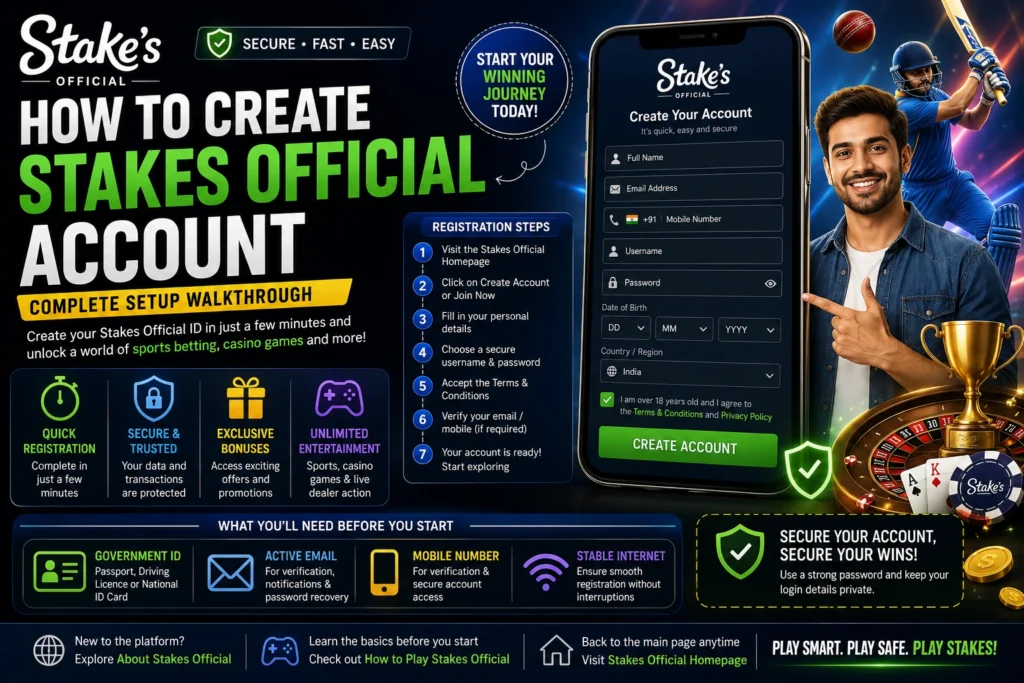
How To Create Stakes Official Account – Complete Setup Walkthrough
Creating your Stakes Official ID is the first step toward accessing everything the platform offers. Whether you’re interested in sports betting, live cricket markets, online casino games, or live dealer experiences, your account acts as your personal gateway to the entire ecosystem.
Without a registered account, you can browse odds and explore available games, but you won’t be able to place bets, participate in casino games, deposit funds, or withdraw your winnings. Once your account is created, you gain access to a secure dashboard where you can manage your balance, review betting history, update personal information, and customize your gaming preferences.
A Stakes Official ID is also linked to your registered email address and personal details, making it an essential part of your account security. Since the information provided during registration is later used for account verification, it’s important to enter accurate details from the beginning. This helps prevent delays when completing verification or requesting withdrawals.
If you’re completely new to the platform, it’s worth spending a few minutes exploring About Stakes Official before starting the registration process. Understanding how the platform works makes the entire setup experience much smoother.
What You'll Need Before Creating Your Stakes Official ID
Preparing a few essential details before starting registration can make the process much faster. Most users complete their account setup in just a few minutes when everything is ready in advance.
Government Identification
Keep a valid government-issued identification document ready. This may include your passport, driving licence, or national identity card. Although full verification is usually completed later, having your documents prepared helps avoid unnecessary delays.
The name entered during registration should match your identification exactly. Even minor spelling differences may create verification issues in the future.
Active Email Address
Your email address plays an important role throughout the life of your account. Stakes Official uses it for account verification, password recovery, important notifications, and security alerts.
Choose an email address that you regularly access rather than one you rarely check.
Mobile Number
An active mobile number is equally important. It may be used for verification, security notifications, and two-factor authentication if enabled. Using your primary mobile number helps keep your account secure.
Stable Internet Connection
Whether you register from your desktop browser or smartphone, ensure your internet connection remains stable throughout the registration process. Interruptions during signup can sometimes require restarting certain steps.
Many players prefer registering directly through the official website, while others use the mobile version depending on their convenience.
Beginning The Stakes Official Registration Process
Creating your account begins by visiting the Stakes Official Homepage . Once the homepage loads, you’ll immediately notice various sports markets, casino categories, promotions, and featured events.
Look for the Create Account, Register, or Join Now button displayed prominently on the homepage. Selecting this option opens the registration form where you’ll begin entering your personal information.
Before completing the form, you may also want to explore the available games and betting categories through How to Play Stakes Official . This gives first-time users a better understanding of the platform before creating their account.
Entering Your Registration Details
The registration form requests several basic details required for creating your Stakes Official ID.
You will normally be asked to provide:
- Your full legal name
- Active email address
- Mobile number
- Preferred username
- Secure password
- Date of birth
- Country or region
- Acceptance of platform terms and conditions
Every field should be completed carefully. Your legal name should match your official documents exactly, while your email address should be one that you actively use.
Your username becomes your permanent identity across the platform. Since usernames are usually difficult to change later, choose something memorable without including unnecessary personal information.
Creating a strong password is equally important. Combine uppercase letters, lowercase letters, numbers, and special characters to improve account security. Avoid using birthdays, names, or simple number sequences that are easy to guess.
Choosing A Secure Username And Password
Many users underestimate how important account security is during registration. Your username may appear across certain platform features, but your password should always remain private.
A secure password protects your account balance, transaction history, and personal information from unauthorized access.
Good password practices include:
- Using at least 10–12 characters
- Including uppercase and lowercase letters
- Adding numbers and symbols
- Avoiding dictionary words
- Never reusing passwords from other websites
Remember, the Stakes Official support team will never ask for your password. If anyone requests it while claiming to represent the platform, do not share your credentials and immediately contact Contact Stakes Support .

Completing Your Stakes Official Registration
Once you have entered all the required information, take a moment to review every detail before clicking the final registration button. A few extra seconds spent checking your information now can save you from verification issues later.
Confirm that your legal name, email address, mobile number, username, and date of birth are correct. These details become part of your permanent account profile and may be checked against your identity documents during the verification process.
After reviewing everything carefully, accept the platform’s Terms & Conditions and Responsible Gaming Policy before submitting your application.
Once submitted, Stakes Official automatically begins processing your registration request. The system checks whether your email address has already been used and verifies that your selected username is available.
If all information is valid, your account is created immediately and a verification email is sent to your registered email address.
Email Verification And Account Activation
Email verification is one of the most important steps after creating your Stakes Official ID.
The verification email confirms that you own the email address used during registration and allows Stakes Official to communicate important account updates, password recovery instructions, promotional offers, and security notifications.
Open your inbox and locate the verification email from Stakes Official.
If you don’t see it immediately:
- Check your Spam folder
- Check your Promotions folder
- Wait a few minutes
- Request another verification email if necessary
Click the activation link provided in the email.
Once verified, your account becomes active and you can sign in using your registered credentials through the Stakes Official Login page.
If the verification email still doesn’t arrive after several attempts, you should immediately contact Contact Stakes Support for assistance.
Logging Into Your Stakes Official Account
After email verification, logging into your account is straightforward.
Visit the Stakes Official Login page and enter your username or registered email address together with your password.
Once authenticated successfully, you’ll be redirected to your personal dashboard.
From here you can access:
- Sports betting markets
- Cricket betting
- Live casino games
- Casino promotions
- Account settings
- Wallet management
- Deposit options
- Transaction history
- Customer support
The dashboard is designed to provide quick access to every important section of the platform without unnecessary navigation.
If this is your first login, spend a few minutes exploring the available menus before placing your first wager.
Your First Dashboard Experience
Your dashboard serves as the control centre for your entire Stakes Official account.
Immediately after registration, you’ll notice that your wallet balance is zero because no deposits have been made yet.
You’ll also find several important sections including:
Sports Betting
Browse upcoming cricket matches, football leagues, tennis tournaments, basketball games and many other sporting events available for betting.
Casino Games
Explore hundreds of casino titles including:
- Slots
- Blackjack
- Roulette
- Baccarat
- Poker
- Live Dealer Games
- Crash Games
If you’re unfamiliar with these games, visit How to Play Stakes Official to understand their rules before getting started.
Account Settings
Your profile section allows you to manage:
- Personal information
- Password changes
- Language preferences
- Notification settings
- Security options
Keeping your profile updated helps ensure a smoother verification process later.
Account Verification Before Real-Money Gaming
Although your account has been created successfully, some platform features remain restricted until identity verification is completed.
Verification protects both users and the platform from fraud while ensuring compliance with applicable regulations.
You may be asked to provide:
- Government-issued ID
- Proof of address
- Date of birth confirmation
- Mobile verification
- Email confirmation
Always upload clear, high-quality images to avoid delays.
Incomplete or blurry documents often require resubmission, extending verification times unnecessarily.
Making Your First Deposit
Once verification requirements are completed, you’re ready to fund your account.
Navigate to the wallet section and choose your preferred payment method.
Before depositing, it’s recommended to read the complete How to Deposit on Stakes guide. It explains supported payment methods, deposit procedures, processing times, and important security tips for first-time users.
After your deposit is credited, you’ll gain access to the full range of sports betting markets and casino games available on the platform.
Protecting Your Stakes Official ID
Your Stakes Official ID is unique and should never be shared with anyone.
To maintain account security:
- Never share your password.
- Enable two-factor authentication whenever available.
- Avoid logging in on public Wi-Fi networks.
- Always log out after using shared devices.
- Update your password periodically.
- Ignore messages requesting your login credentials.
Remember that official support representatives will never ask for your password.
If you notice suspicious activity, immediately change your password and contact Contact Stakes Support .
Language And Regional Preferences
During registration, you’ll select your preferred language and country.
These settings determine:
- Platform language
- Promotional offers
- Regional betting availability
- Time zone display
- Notification preferences
The good news is that most of these preferences can be updated later through your account settings.
Choosing the correct region ensures you receive relevant promotions and accurate event timings throughout your gaming experience.
Creating Your Stakes Official Account On Mobile
Many users prefer creating their Stakes Official ID directly from their smartphone because it allows them to register anytime and anywhere. Whether you’re using an Android device or an iPhone, the registration process remains almost identical to the desktop version.
If you’re using Android, download the official application from the Stakes Official Homepage . iPhone users can access the platform through the supported application or use their preferred mobile browser.
After opening the app or website, tap the Create Account button and complete the registration process exactly as you would on a desktop browser.
The mobile registration form requests the same information:
- Full legal name
- Email address
- Mobile number
- Username
- Password
- Date of birth
- Country selection
- Acceptance of Terms & Conditions
Since smartphones allow instant email access, many players complete email verification immediately after registration without switching devices.
Mobile App Vs Browser Registration
One of the most common questions among new users is whether they should register through the mobile app or a web browser.
The answer depends entirely on your preference because both methods create exactly the same Stakes Official ID.
Mobile App Benefits
Creating your account through the mobile application offers several advantages:
- Faster future logins
- Better mobile optimisation
- Push notifications
- Easy access to sports markets
- Convenient wallet management
- One-tap access to casino games
Many regular users prefer the app because it allows quick access to betting markets while travelling.
Browser Registration Benefits
Browser registration is equally secure and provides:
- Larger screen for completing forms
- Easier document uploads
- Better visibility during verification
- No application installation required
Regardless of the method you choose, your account remains identical across every device.
Preparing For Identity Verification
Creating your account is only the beginning.
Before deposits and withdrawals become available, you’ll eventually need to complete identity verification.
Preparing your documents early saves considerable time later.
Keep the following documents ready:
- Government-issued ID
- Passport
- Driving licence
- National identity card
- Utility bill
- Bank statement
- Address proof
The details entered during registration should perfectly match these documents.
For example:
If your identification shows Rahul Kumar Sharma, avoid registering as:
- Rahul Sharma
- R Kumar
- Rahul K
- RK Sharma
Even small differences can delay verification.
Using accurate information from the beginning makes the approval process much smoother.
Common Registration Mistakes To Avoid
Although the registration process is simple, many first-time users make small mistakes that later create unnecessary problems.
Here are some of the most common issues.
Using An Incorrect Email Address
Your email is one of the most important parts of your account.
A spelling mistake can prevent verification emails from reaching you.
Always double-check your email before submitting the registration form.
Choosing A Weak Password
Weak passwords are one of the biggest security risks.
Avoid passwords such as:
- 123456
- password
- abc123
- your birthday
- your mobile number
Instead, create a password using:
- Uppercase letters
- Lowercase letters
- Numbers
- Special characters
A stronger password significantly improves account security.
Selecting An Already Used Username
Every username on Stakes Official must be unique.
If your preferred username is unavailable, try:
- Adding numbers
- Adding initials
- Using different word combinations
Choose carefully because usernames are generally permanent after registration.
Entering Incorrect Personal Details
Incorrect information is one of the main reasons verification requests are delayed.
Before clicking Register, verify:
- Name spelling
- Date of birth
- Email address
- Mobile number
- Country selection
Taking one extra minute now can prevent several days of correction later.
Registration Problems And Their Solutions
Verification Email Not Received
If no verification email arrives:
- Check Spam folder
- Check Promotions folder
- Wait 10–15 minutes
- Request another email
If the problem continues, contact Contact Stakes Support .
Username Already Exists
This simply means another user has already selected that username.
Create a new variation and continue registration.
Duplicate Email Message
If the system reports that your email is already registered, you probably created an account previously.
Instead of registering again, use the password recovery option available on the Stakes Official Login page.
Country Restriction
Certain regions have restrictions regarding online gaming.
If registration is unavailable in your location, the platform will notify you during signup.
Always follow your local laws before creating an account.
Browser Not Working Properly
Sometimes browser extensions or stored cache interfere with registration.
You can try:
- Refreshing the page
- Clearing browser cache
- Using Incognito Mode
- Trying another browser
- Switching to another device
These simple steps solve most browser-related issues.
Keeping Your Stakes Official Account Secure
Account security should remain a priority even after successful registration.
A few good habits help protect your account from unauthorized access.
Security recommendations include:
- Never share your password.
- Enable two-factor authentication if available.
- Change your password regularly.
- Log out after using public devices.
- Avoid saving passwords on shared computers.
- Ignore suspicious emails asking for login details.
Remember, official representatives will never ask for your password.
If you ever suspect unauthorized access, immediately change your password and contact Contact Stakes Support .
Learn More Before You Start Playing
Creating your Stakes Official ID is only the beginning of your journey.
Before placing your first bet, it’s worth understanding how the platform works.
You can explore How to Play Stakes Official to learn the basics of sports betting, casino games, and platform navigation.
If you’re planning to fund your wallet, the How to Deposit on Stakes guide explains supported payment methods, deposit steps, and important security practices.
You can also visit the Stakes Official Blog for beginner guides, betting strategies, platform updates, and educational content to help you make the most of your experience.






Still Have Questions?
How long does it take to create a Stakes Official account?
Creating a Stakes Official ID usually takes between 5 and 10 minutes if you have all the required information ready. After submitting your registration details, you’ll receive an email verification link. Once your email is verified, your account becomes active immediately. If identity verification is required before accessing financial features, the review time may vary depending on document accuracy and verification workload.
Is creating a Stakes Official account free?
Yes. Registering for a Stakes Official ID is completely free. There are no charges for creating your account or exploring the platform. However, you’ll need to make your first deposit before accessing real-money sports betting and casino games. You can learn more about supported payment methods in How to Deposit on Stakes .
Can I create a Stakes Official account using my mobile phone?
Absolutely. You can create your account using an Android device, iPhone, tablet, or desktop browser. The registration process remains exactly the same across all devices, allowing you to manage your account from anywhere after successful registration.
Can I change my username after registration?
In most cases, usernames are permanent once your account has been created. Since your username becomes part of your account identity, choose something memorable during registration. If you experience any issues, contact Contact Stakes Support for guidance.
What documents are required for verification?
Identity verification generally requires a government-issued ID such as a passport, driving licence, or national identity card. Some users may also be asked to submit proof of address through a recent utility bill or bank statement. Make sure all submitted information matches the details entered while creating your Stakes Official ID.
What should I do if I don't receive the verification email?
First, check your Spam or Promotions folder. If the email still doesn’t appear, wait a few minutes and request another verification email. Ensure that the email address entered during registration is correct. If the problem continues, contact Contact Stakes Support for immediate assistance.
Can I use the same email address for multiple Stakes Official accounts?
No. Each email address can only be linked to one account. If your email is already registered, use the password recovery option available on the Stakes Official Login page instead of creating another account.
Is my personal information secure?
Yes. Stakes Official uses advanced encryption technologies and multiple security measures to protect user information. However, account security also depends on users following good practices such as creating strong passwords, enabling two-factor authentication where available, and never sharing login credentials with anyone.
Can I start betting immediately after registration?
You can explore the platform immediately after registration, but real-money betting usually requires account verification and your first successful deposit. Once your wallet has been funded, you’ll gain access to sports betting markets and casino games available on the platform.
How do I make my first deposit?
After logging into your account, navigate to the wallet or cashier section and choose your preferred payment method. Before depositing, it’s recommended to read How to Deposit on Stakes for a complete step-by-step guide.
Can I access casino games after creating my account?
Yes. Once your account has been verified and funded, you’ll have access to a wide variety of casino games including blackjack, roulette, baccarat, poker, slots, crash games, and live dealer tables. If you’re new to casino gaming, visit How to Play Stakes Official to understand the available games.